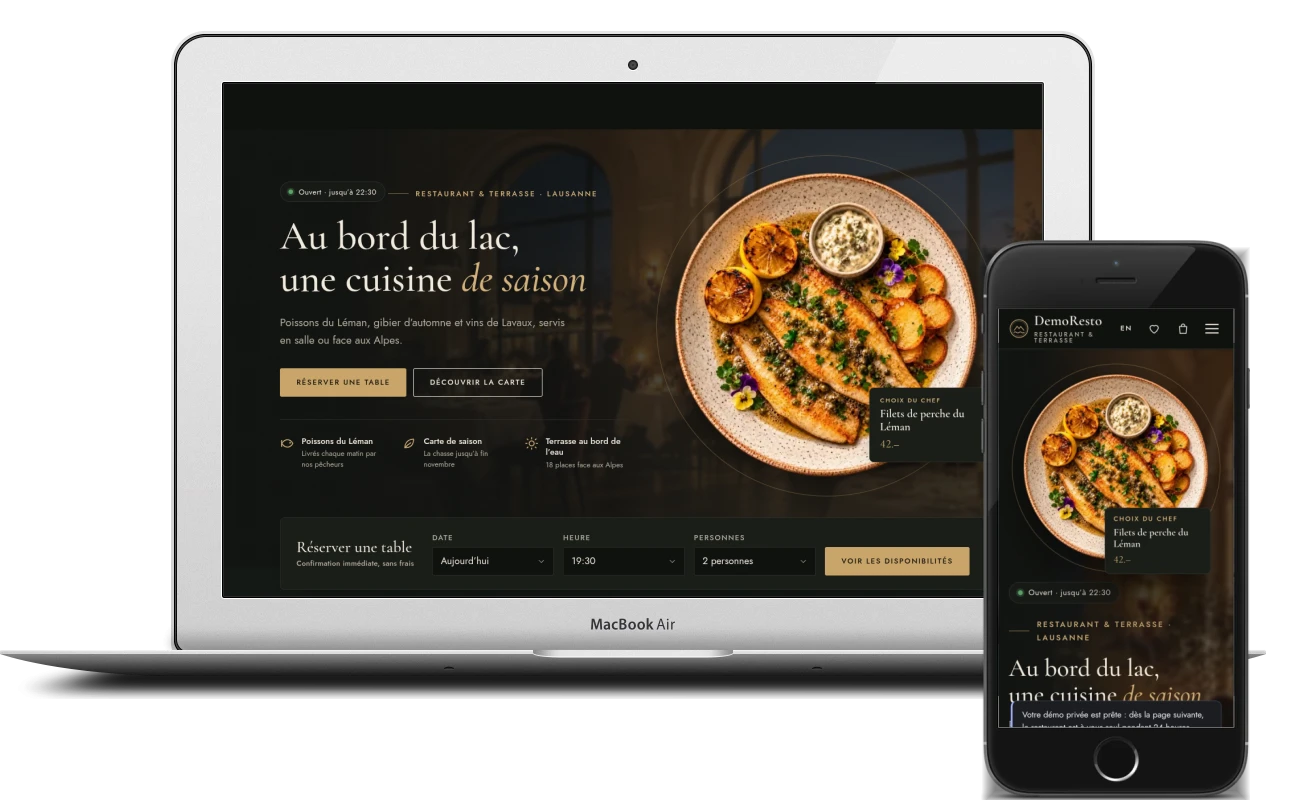
Restaurants, cafés and bars in French-speaking Switzerland need more than a good-looking website: they need a tool that takes bookings, orders and enquiries while the team is busy on the floor. DemoResto shows such a solution in full – in three packages you can try before ordering anything.
Why I built DemoResto
It is hard for restaurateurs to choose a website from a description: phrases like “online booking” and “back office” mean little until you try them yourself. So instead of a presentation, I built DemoResto – a fictional restaurant with a dining room, a terrace and a private room on the shores of Lake Geneva in Lausanne. Everything a real restaurant would get works here: the menu, booking, ordering, gift cards, events and the team back office.
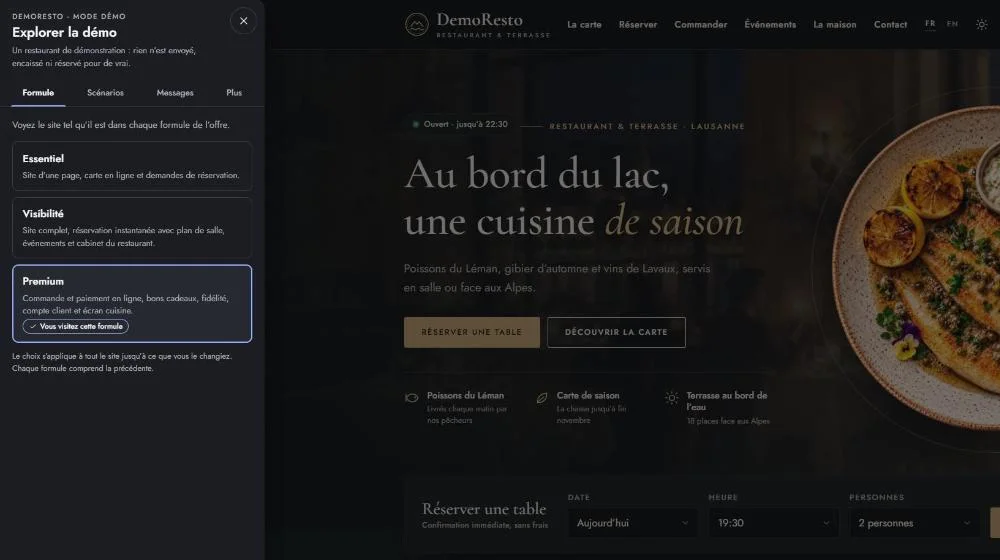
There are two ways to explore the demo – as a guest and as the owner. The “Démo” panel offers ready-made scenarios: “Dinner for two”, “Order for home”, “At the restaurant”, “Banquet”, “Gift card”, “Menu management” and “Guest account”. Payments and e-mails are only simulated: nothing leaves the site, and the e-mails it sends can be read right inside the demo.
In the shared demo, the back office is read-only and guests’ personal details are hidden. To change prices, accept bookings or issue gift cards, visitors launch their own copy of the restaurant: for 24 hours it is available to them alone, and then it is wiped.
Three packages: what each one includes
The core idea of the product is one website that grows with the venue. The packages differ in features, not in the quality of the design, and each one includes the previous one. In the demo you switch between them with one click.
Essentiel – a digital front door. For a café, bar, tea room or bakery that mainly needs to be found and called:
- a one-page site built for the phone first
- an online menu the owner edits themselves – instead of a PDF
- allergens, dietary options and a printable version of the menu
- opening hours, a map, directions, “Call” and WhatsApp buttons
- a QR menu for the tables
- a table request form
Visibilité – guests book by themselves. For a restaurant with a dining room that needs to fill its tables without phone calls at peak time:
- instant online booking on the floor plan
- a multi-page site: about the venue, gallery, news, contact
- an events calendar and a banquet page with an online enquiry form
- a restaurant back office: booking calendar, floor plan, enquiries, guests
- guest reviews on the home page and a jobs page with an application form
Premium – the venue sells online. For places that do takeaway, delivery and events:
- online takeaway and delivery orders: pick-up times, delivery zones, minimum order value
- payment by card and TWINT
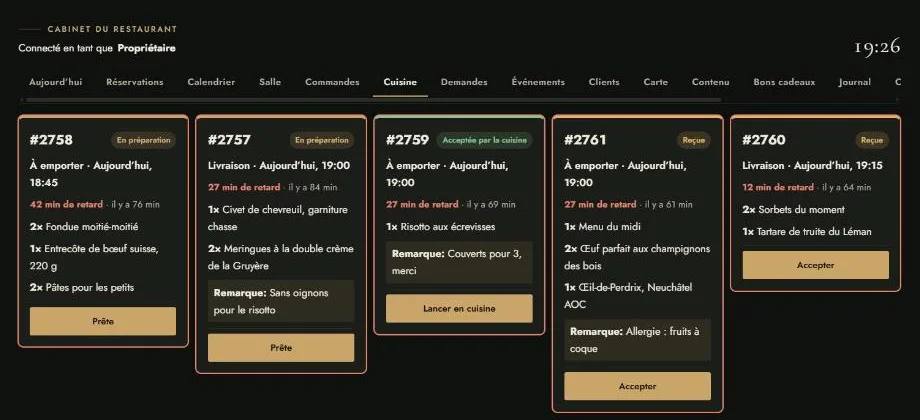
- a kitchen screen and order tracking for the guest
- ordering from the table via QR code, calling the waiter and asking for the bill
- gift cards, loyalty points and a guest account
- reminders and deposits for bookings, event sign-ups with limited places, banquet menus and group pre-orders
Beyond the website itself, the packages include setting up the Google Business Profile, Swiss directories and social media profiles, and the number of languages grows too: from French in Essentiel to four languages in Premium.
Booking on the floor plan
Booking is the heart of the Visibilité package. Guests choose a date and the number of people, then a time from the available slots and a place: the dining room, the terrace or a private room. They can pick a specific table right on the floor plan. While the guest is entering their details, the table is held for them, so double bookings simply can’t happen.
Once the booking is confirmed, the guest receives an e-mail with the booking number and can add the visit to their calendar or change or cancel the booking via a secure link. If everything is taken, they can join the waiting list. Groups of more than eight can request a group menu, and in Premium a deposit can be taken for large tables.
The “Rooms and terrace” page shows each area with photos and a plan, along with how many tables are still free for the next dinner service – taken straight from the bookings.
Menu, online ordering and QR table ordering
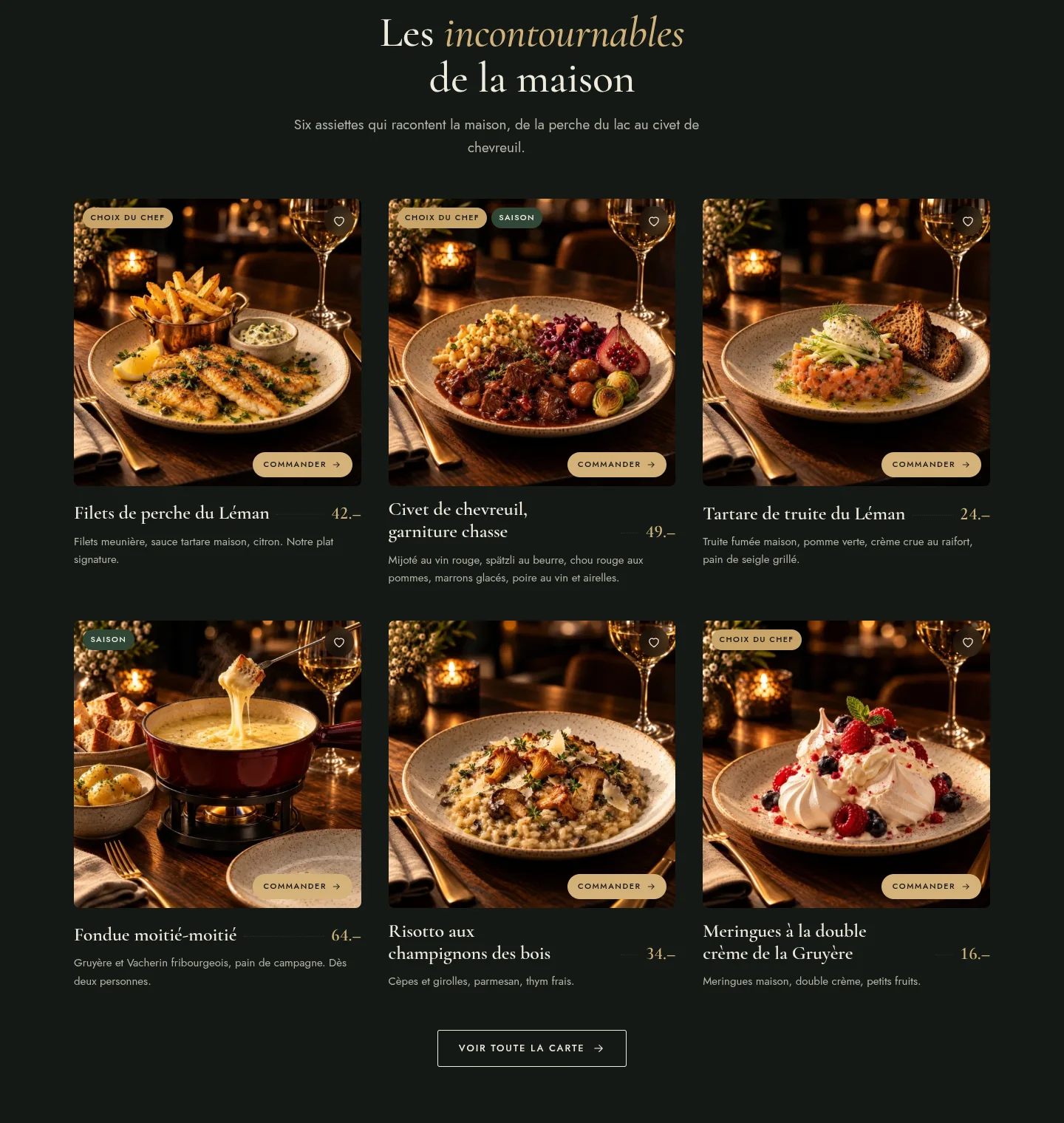
The menu is not a PDF but a live catalogue of dishes that the owner edits. Guests can search by dish or ingredient, filter by diet (vegetarian, vegan, gluten-free, lactose-free), exclude any of the 14 allergens and use a “served now” filter. The menu can also be printed or saved as a PDF.
Dishes have options and extras, and the price updates as soon as they are selected. A dish outside its serving hours or marked as sold out can’t be ordered, and sold-out dishes come back automatically the next day.
In Premium, guests place takeaway or delivery orders. The site suggests a pick-up time based on how busy the kitchen is and how long the dishes in the basket take to prepare, checks the address against the delivery zones, and applies the minimum order value and the free delivery threshold. Promo codes, card payments and TWINT all work, and after paying, the guest can follow the order through each stage: accepted, being prepared, ready, on its way.
In the dining room, every table has a QR code: the menu opens with the table number, guests order from their phone, call the waiter or ask for the bill – and the team sees the request instantly.
Restaurant back office: the whole service on one screen
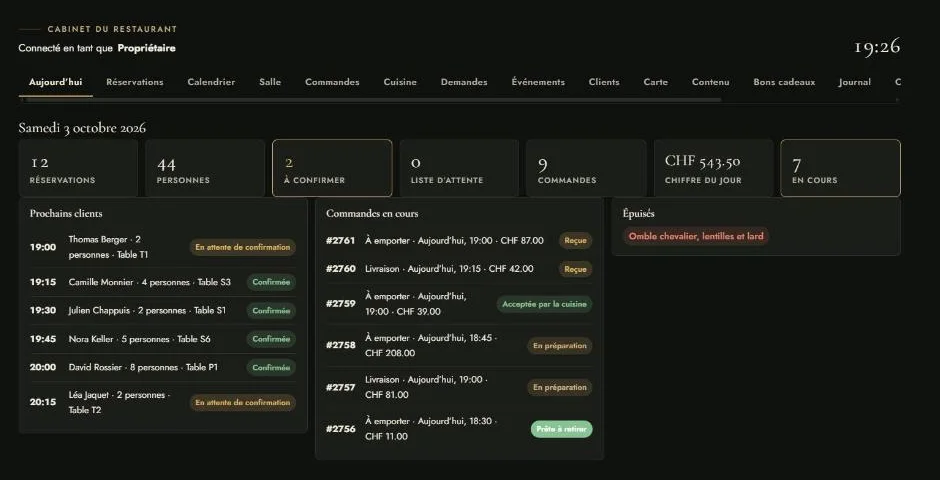
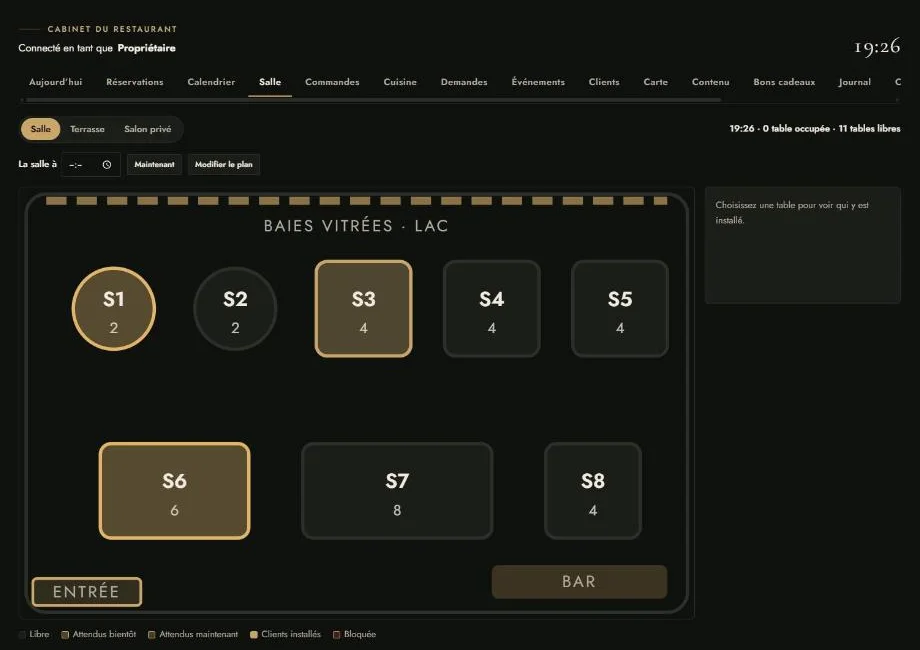
For the team, I built a separate back office that doesn’t involve the WordPress admin at all. It has a section for every part of the job: “Today”, bookings and calendar, a live floor plan, orders and the kitchen screen, enquiries, events, guests, menu, website content, gift cards, figures, team, settings and loyalty.
Access is split by role: the owner, manager, front-of-house manager, kitchen and editor each see and change only what concerns them. The floor plan shows which tables are free, where guests are expected any minute and where they are already seated. Banquet enquiries become guest cards with an assigned team member and notes, and lists can be exported to CSV.
The “Figures” section shows totals for the last 30 days and the most popular dishes.
Gift cards, loyalty and events
Gift cards are bought online: a fixed or custom amount, one of three designs and a message for the recipient. Each card comes with a personal code and a printable PDF, and it can be spent in several goes – in the restaurant, staff redeem it through the back office, never for more than the remaining balance.
Regular guests collect loyalty points and get a birthday treat. The guest account shows the next booking, past orders, favourites and points; a favourite order can be repeated in one click, and part of the bill can be paid with points.
The events page lists what’s coming up and also shows it as a monthly calendar; each event has its own page and a counter of the places left. The banquet enquiry form collects the date, format, number of guests and budget, and lets the guest choose a banquet menu and place a group pre-order for dishes straight away.
Design and brand identity
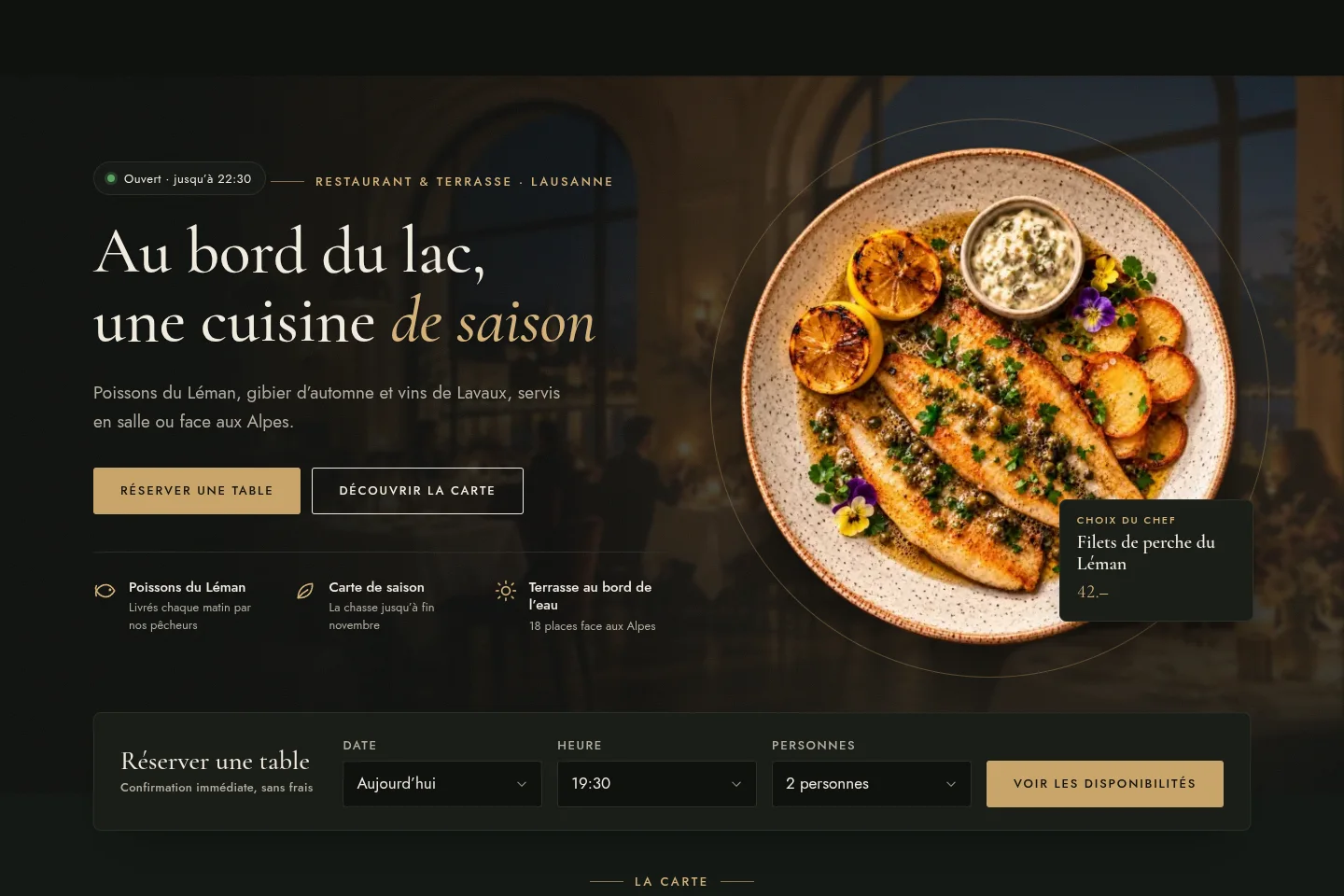
People eat with their eyes first, so the design is built around the food: the first screen shows a plate shot from above with a price badge, followed by alternating dark and light sections with square photos of dishes. The site has a dark and a light theme, and guests can switch between them.
Along with the website, the venue gets a brand identity gathered on a separate page: a logo mark, colour palettes for both themes, the Cormorant Garamond and Jost typefaces, buttons and price tags in the Swiss “34.–” format, an icon set, guidelines for food photography and the tone of voice. The site is built for the phone first.
Why a restaurant needs its own website, not just platforms
Guests check Google first, then the menu, and only then decide whether to book or go next door. A restaurant loses them at simple points: nobody picks up the phone in the middle of service, the PDF menu can’t be read on a phone, a tourist doesn’t understand French.
Delivery and booking platforms do bring in new guests, but they take 25–35% of every order and keep the guest’s contact details for themselves. Your own website doesn’t replace them entirely – it brings your regular guests back to you:
- bookings and orders come in with no commission per guest
- the domain, the website and the guest database belong to the restaurant
- the owner changes the menu and prices in a couple of minutes
- banquet enquiries don’t get lost in the inbox
You don’t have to start with everything. A café can launch with Essentiel and add booking, ordering or a second language to the same website later – without rebuilding it.
Project details
Project typeready-made solution for restaurants (my own product)
CategoryWordPress website
TechnologiesWordPress, WooCommerce, PHP, JavaScript, REST API, custom burum theme, Nik Restaurant plugin, Nik Translate, Nik Custom Fields, Nik AI Search & Filters, Nik Wishlist, Nik Quick Order, Nik Cookie Consent, Nik Analytics
Rolethe whole product: concept and structure of the three packages, design and brand identity, restaurant theme and plugin, WooCommerce online ordering, team back office, demo mode, English version
Clientmy own product (DemoResto demo restaurant)
CountrySwitzerland
What was done
- Planned three packages – Essentiel, Visibilité and Premium – on one foundation
- Designed the site with dark and light themes and a brand identity for the venue
- Built the menu with options, 14 allergens, filters, sold-out dishes and printing
- Developed booking on the floor plan with a waiting list and booking changes via a link
- Set up WooCommerce online ordering: pick-up times, delivery zones, payment, tracking
- Added ordering from the table via QR code, calling the waiter and asking for the bill
- Built gift cards, loyalty points and a guest account
- Built the restaurant back office with roles: bookings, floor, kitchen, enquiries, guests, menu, figures
- Created the demo mode: package switcher, scenarios and a personal copy for 24 hours
- Translated the site into English
Result
- A ready-made solution that suits a café as well as a restaurant with delivery
- A live demo where restaurateurs try everything themselves – as a guest and as the owner
- A clear ladder of packages: start small and add features without rebuilding
- A foundation for real restaurant websites in French-speaking Switzerland