EVA mats are bought for a specific car, so attractive photos aren’t enough for a manufacturer’s website – it has to help people find their model and put a set together. Using EVACraftAuto as an example, I explain how I built a landing page with a search by make, model and year, a mat configurator, priced sets and enquiry forms.
The company and the brief
EVACraftAuto is a Ukrainian manufacturer of car mats made from EVA. The company is based in Lviv and ships orders all over Ukraine. Mats are made in 1–2 days to the original templates for each car model, and buyers can add heel pads in different shapes and badges with their car’s logo. On its website, the company cites 3,500+ car models and 150+ options for a single car.
An EVA mat is chosen for a specific car, so buyers always have three questions: is there a template for my car, how much does a set cost and how will it look inside? The landing page had to answer them without a phone call, which is why the car search and the mat configurator sit at the heart of the page. The other blocks follow the order in which the questions come up: why trust you, how much it costs, is my car covered, what my mat will look like and what happens after I order.
Header, first screen and the manufacturer’s case
The header is a white bar with rounded corners floating over the first screen: the logo, a menu with “Catalogue”, “Benefits”, “Our work”, “Partnership”, “Contacts” and “FAQ”, Telegram and Viber icons and a yellow button with the phone number. Below it are a darkened photo of an EVA mat in a car, the heading “Next-generation car mats”, the brand name in yellow and the line “Manufacturer of car mats made from EVA”. There is just one button – “Configurator” – and it takes visitors straight to the most useful tool on the page.
Next, the landing page answers the question “why you?”. The “Why choose EVACraftAuto?” block has six cards with yellow icons:
- individual templates for any car;
- a material that doesn’t absorb moisture, resists wear and is easy to clean;
- made to order in 1–2 days;
- more than 13 base colours and 15 edging colours;
- heel pads in different shapes and badges with the car’s logo;
- delivery all over Ukraine.
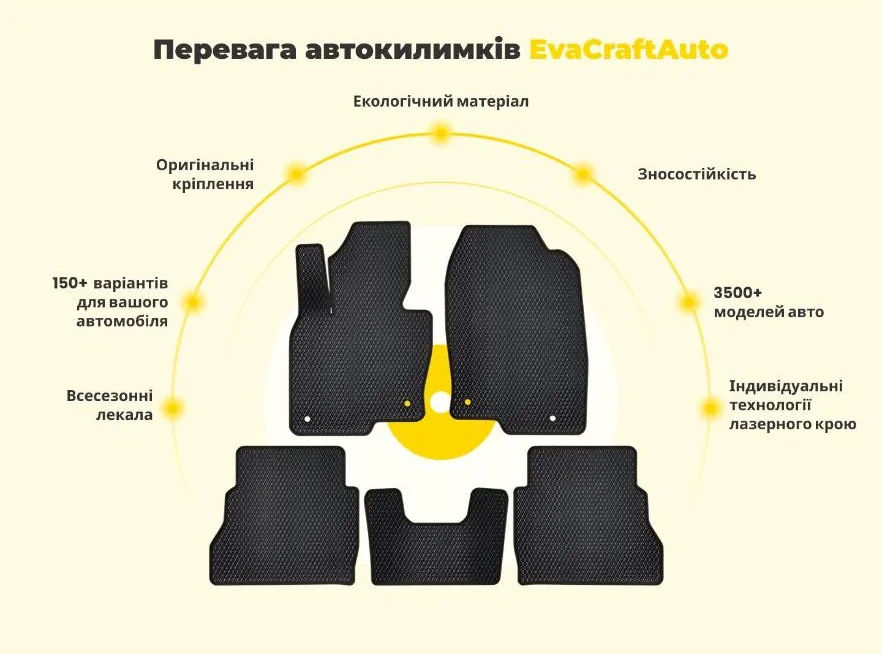
It is followed by an “About us” block over a dark photo of a car interior, with three numbered photo cards under “Why us?”, and the infographic “Benefits of EvaCraftAuto car mats”: seven benefits arranged in an arc around a set of mats, from the eco-friendly material and original fasteners to 3,500+ car models and laser cutting. Dark graphite sections alternate with light cream ones, and the yellow of the logo highlights buttons, prices and selected options.
Six sets with prices
The “Sets” block answers the price question before any conversation with a manager. Each of the six cards shows the price in hryvnias in a yellow frame, a top view of a car with the mats in the set highlighted in yellow, a round inset with the material texture and a list of contents:
- Basic – UAH 1,350: any one row of a passenger car;
- Boot – UAH 1,590: a boot mat and a Velcro fastening system;
- Comfort – UAH 1,990: two front and two rear mats, a centre tunnel piece, original fasteners and Velcro floor strips;
- Style – UAH 2,900: everything in Comfort, plus four badges with the car’s logo and a metal heel pad;
- Comfort Plus – UAH 3,430: the Comfort set plus a boot mat;
- Elite – UAH 4,340: front and rear mats, a tunnel piece, fasteners and Velcro strips, four badges and a metal heel pad.
A car diagram works faster than any list: in a second, buyers can see which areas of the interior the set will cover.
Search by make, model and year
The first thing a car owner wants to know is whether there’s a template for their car. That’s why the car search is a separate block right before the configurator, and it works in three steps:
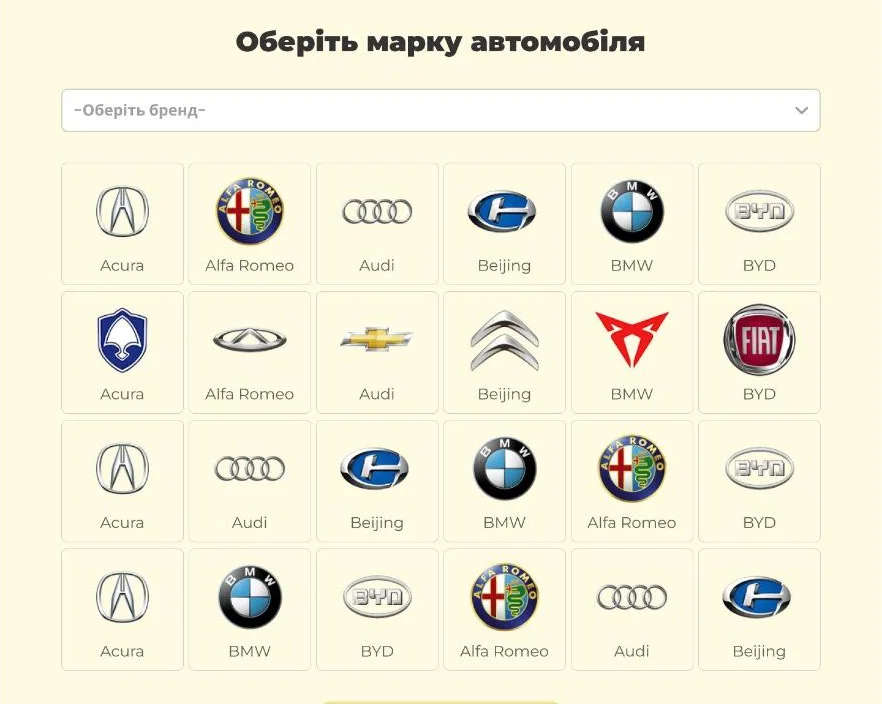
- make – a “Choose a brand” drop-down and a grid of tiles with brand logos and names; four rows are visible at first, and the “Show more” button reveals the rest;
- model and year – two drop-downs on one line;
- a “Clear search” button resets the choice when you need mats for another car.
A logo is recognised faster than a name in a long list, so the brand grid is the shortest way to your own car. And the page doesn’t let go of people who can’t find their model: right after the configurator there’s a dark “Couldn’t find your car?” card with “Phone”, “Name” and “Description” fields, a “Send” button and a car under a yellow cover.
The EVA mat configurator
The configurator is the landing page’s main tool: it replaces long back-and-forth messages about what the mat will look like. On the left is a large image of the mat – in the screenshot it’s yellow with a diamond texture, exactly as selected in the settings on the right. Below it are three photos of finished mats in cars and an honest note: the photo is generic, the mats will match your car’s configuration, and the colour on screen may differ slightly.
On the right are cards with the options, and next to each option’s name a yellow frame shows the current choice: “First and second rows”, “Diamond”, “Yellow”, “Black”. Buyers choose:
- the set – four top-view car icons with the rows highlighted and the price: UAH 1,350, 1,990, 3,430 and 1,590;
- the material type – round texture swatches, including diamond and honeycomb;
- the mat colour – 13 swatches showing the material texture;
- the edging colour – a separate palette in two rows;
- a badge with the car’s make – an image of the badge and a drop-down;
- a heel pad – one of three: EVA (free), square or shaped.
At the bottom are the “Total” block and a yellow “Order the set” button. Buyers put the mat together themselves, see the result and arrive at the order with their mind made up – all the manager has to do is confirm the details by phone.
Process, finished work and before/after
Ordering is easier when you know what happens next and can see real work:
- “How we work” – four cards linked by arrows: choosing a set or sending an enquiry on the site, a call from a manager within 30 minutes, production in 1–2 working days and delivery by Nova Poshta;
- “Our work” – a slider of photos of mats in cars, captioned by model, from the BMW X5 to the Mazda CX-5; the active slide is wider than the others, and visitors browse with arrows and dots;
- “Before/after” – a comparison slider: a yellow handle splits the frame between an old textile mat and a new EVA mat in the same car, while arrows and dots switch between pairs of photos;
- “Want to get your mats at a better price?” – a personal offer form over a dark car interior: phone and name.
FAQ and contacts
The last doubts before ordering are dealt with in the “Frequently asked questions” block – an accordion of seven questions: the warranty, what to do if the mats don’t fit, how long they last, smell, whether EVA is hypoallergenic, how strong the material is and how to lay a mat. Each answer opens with a yellow plus button. On smell, for example: new mats may have an odour, but it fades within 2–3 days and doesn’t come back, even in hot weather.
At the bottom of the page are the contacts – phone, city and email over a world map – and a form with “Name”, “Email”, “Subject” and “Message” fields and a “Send message” button.
What matters on a car mat manufacturer’s website
Car mats come in a huge number of variants: make, model, year, set, material, two colours and accessories. Based on this project, a manufacturer’s website like this sells when:
- the car search is easy to see – buyers first check that their car is covered and only then look at prices;
- prices are visible straight away – ready-made sets answer the question “how much does it cost?”;
- there’s a configurator – people put the mat together themselves and see the result instead of describing it in messages;
- photos of real work are captioned with car models – a Tucson owner looks for their own Tucson;
- a before-and-after comparison shows the difference from a textile mat better than any description;
- a short form covers unusual cases – “I couldn’t find my car” shouldn’t mean “I went to a competitor”.
If you make car accessories or any other made-to-fit product, think ahead about which options buyers choose, in what order, and what they need to see before ordering. A landing page with a configurator and a car search then becomes more than a shop window – it becomes a sales tool.
Project details
Project typelanding page with an order configurator
CategoryLanding page
TechnologiesHTML5, CSS3, JavaScript
Rolelanding page development: page build, search by make, model and year, mat configurator, sliders, accordion and enquiry forms
ClientEVACraftAuto
CountryUkraine
What was done
- Ordered the landing page’s blocks around buyers’ questions – from the first screen to the order
- Built the first screen with a “Configurator” button and the header with menu, Telegram, Viber and phone
- Built the benefit blocks: six “Why choose” cards, “About us” and an EVA mat infographic
- Created six set cards with price, car diagram and contents
- Built the car search: brand logo grid with “Show more”, model and year selection, search reset
- Built the EVA mat configurator: set, material type, mat and edging colour, badge, heel pad and total
- Created the “Our work” slider and the “Before/after” comparison slider
- Built the process steps, FAQ accordion and contacts
- Created three enquiry forms: “Couldn’t find your car?”, a personal offer and the contact form
Result
- A landing page for an EVA mat manufacturer that leads from the first screen to a set order
- Search by make, model and year, and a mat configurator with an order total
- Six sets with prices and contents – the price is visible before any call
- Finished work captioned by car model, a before-and-after comparison and answers to common questions
- Three enquiry forms, including one for people who can’t find their car
Visit the project website